Categories:
Author:
Current version:
0.6
About It:
Get it:
Rate it:
Flag it:
If you'd like to provide updated information and do not have access to directly edit, please contact the site admin; thanks!
tjh_listfilter
Description
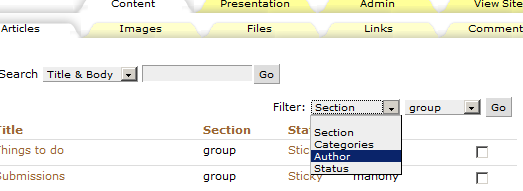
This plugin was made for filtering articles in the admin backend and it’s filtering by sections, categories, authors and statuses. It was made in the bachelor’s work under the direction of Ing. Přemysl Brada, MSc., Ph.D. Because it’s a javascript based plugin, the filtering is done without reloading the page.Usage
After instalation, filter appears at the ‘Articles’ tab on admin side. It will be at the right top corner above the article list. After choosing an item from the filter, a new select box appears next to the first one. Its content – list of sections or categories or authors names or statuses – depends on the previous selection. The whole selection needs to be confirmed by the OK button. To turn filter off switch first filter select on blank item.Screenshot
ChangeLog
2008-03-31 – v0.6
- alphabetically sorting of subcategories
2008-01-31 – v0.5
- state and author filter added
- IE bug fixed
2008-01-06 – v0.4
- filter persistence
2008-01-04 – v0.3
- filter form moved above the article list
2008-01-03 – v0.2
- public release
Keywords/tags:
Initially released:
Jan 31/08
Posted here:
31 Jan 2008